BLOG
- 10 min read
BYFor those familiar with retrieval-augmented generation (RAG), the initial challenge is often preparing the data to be loaded into the vector database. RAG enhances large language models (LLMs) by incorporating an external data store during the inference stage. Data processing can be messy; it requires complex Extraction, Transformation, and Loading (ETL) processes, new database setups, and overcoming various technical hurdles that can be daunting, even for enthusiasts.
Meanwhile, less experienced RAG users need to do even more manual work in order to personalize their LLM outputs and provide new data to LLMs at every step of the way. With all the possibilities to implement RAGs, the right way to go about it is rarely straightforward. Getting RAGs to production is still difficult and intimidates many Python developers due to its notorious deployment complexity. Data management in a RAG pipeline often prevents coders from using RAGs effectively and impedes the accuracy of answers retrieved from LLMs.
With that in mind, in this post, we will explore the possibility of structuring and managing data for AI applications and AI Agents by using DuckDB and applying analytical querying to enrich the data. First, let's define all the platforms and concepts needed for this process to work.
The RAG framework boosts the precision and relevance of LLMs. It tackles two common issues with LLMs: their tendency to provide outdated information and the absence of dependable references. RAG enhances LLMs by integrating them with a retrieval mechanism. Upon receiving a query, RAG doesn't just depend on the LLM's prior training; it first searches a content repository, which might be an open resource like the web or a proprietary set of documents, to find the most recent and pertinent data. The LLM then uses this information to generate a response. This approach not only ensures responses are up to date but also cites sources, thereby significantly reducing the risk of retrieving unfounded or incorrect answers.
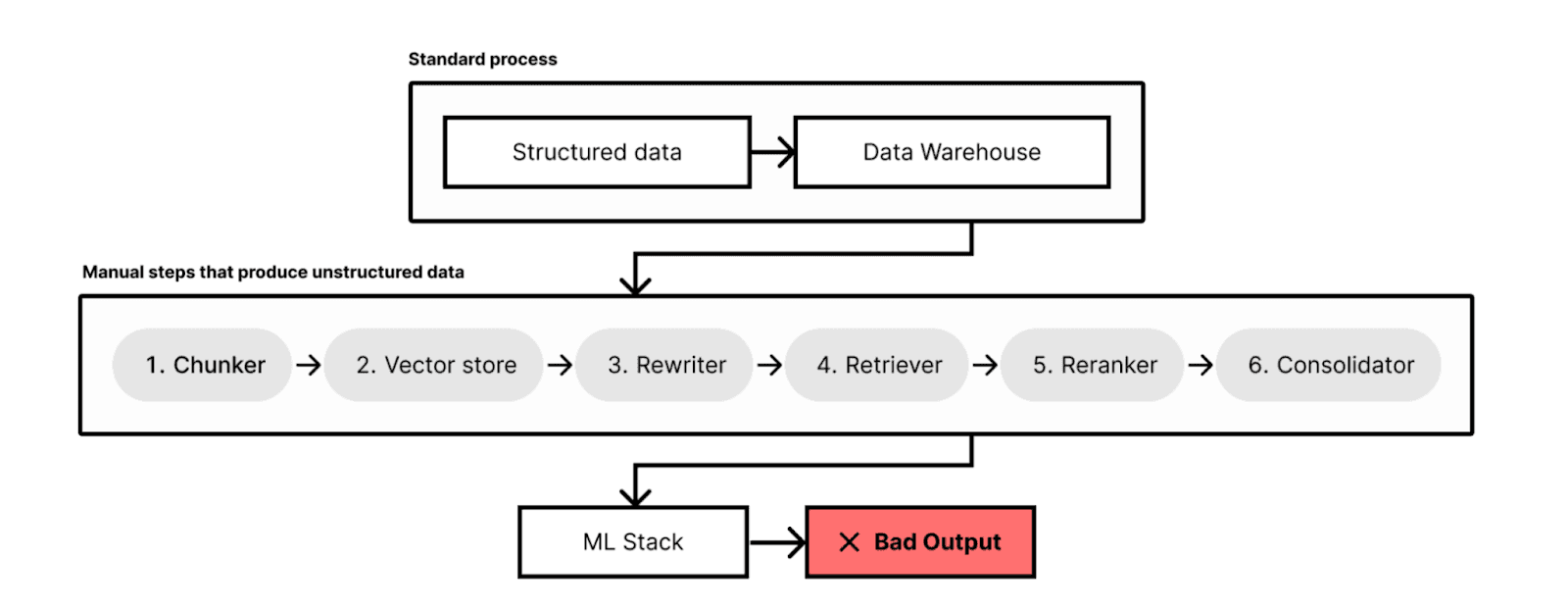
Building a RAG system requires a lot of preparatory work for it to produce meaningful outputs. One of the first requirements is having a solid grasp of the system’s acceptance criteria; once we understand these, we can start thinking about other major components of the system.
Most key activities can be grouped as follows:
Here is an example of a typical RAG system:
DuckDB is an open-source, in-process OLAP database used by data professionals to analyze data quickly and efficiently.
DLT is an open-source library that can be integrated into Python scripts, enabling the loading of data from diverse and frequently disorganized sources into neatly organized, real-time datasets.
Cognee is an open-source framework for knowledge and memory management for LLMs. By using dlt as a data loader and DuckDB as a metastore, Cognee is able to auto-generate customized datasets to enable LLMs to produce deterministic outputs at scale.
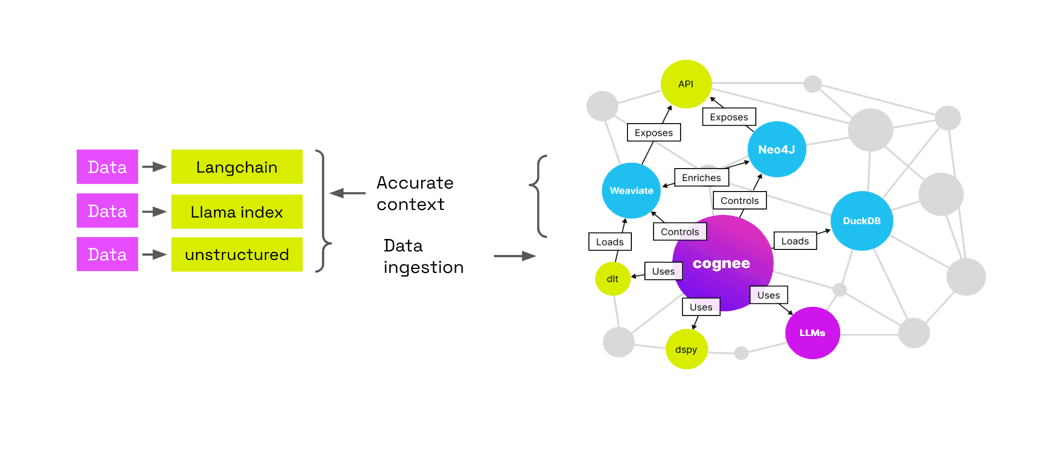
Cognee serves as a plugin for any langchain or llama index pipeline, allowing you to create a semantic layer of text above vector, graph and relational stores. In order to provide deterministic, verifiable outputs, Cognee first needs to perform a few actions.
Let’s walk through how it works step-by-step:
Copy code
“A large language model (LLM) is a language model notable for its ability to achieve general-purpose language generation and other natural language processing tasks such as classification.”
This is what a single, processed document would look in graph form:
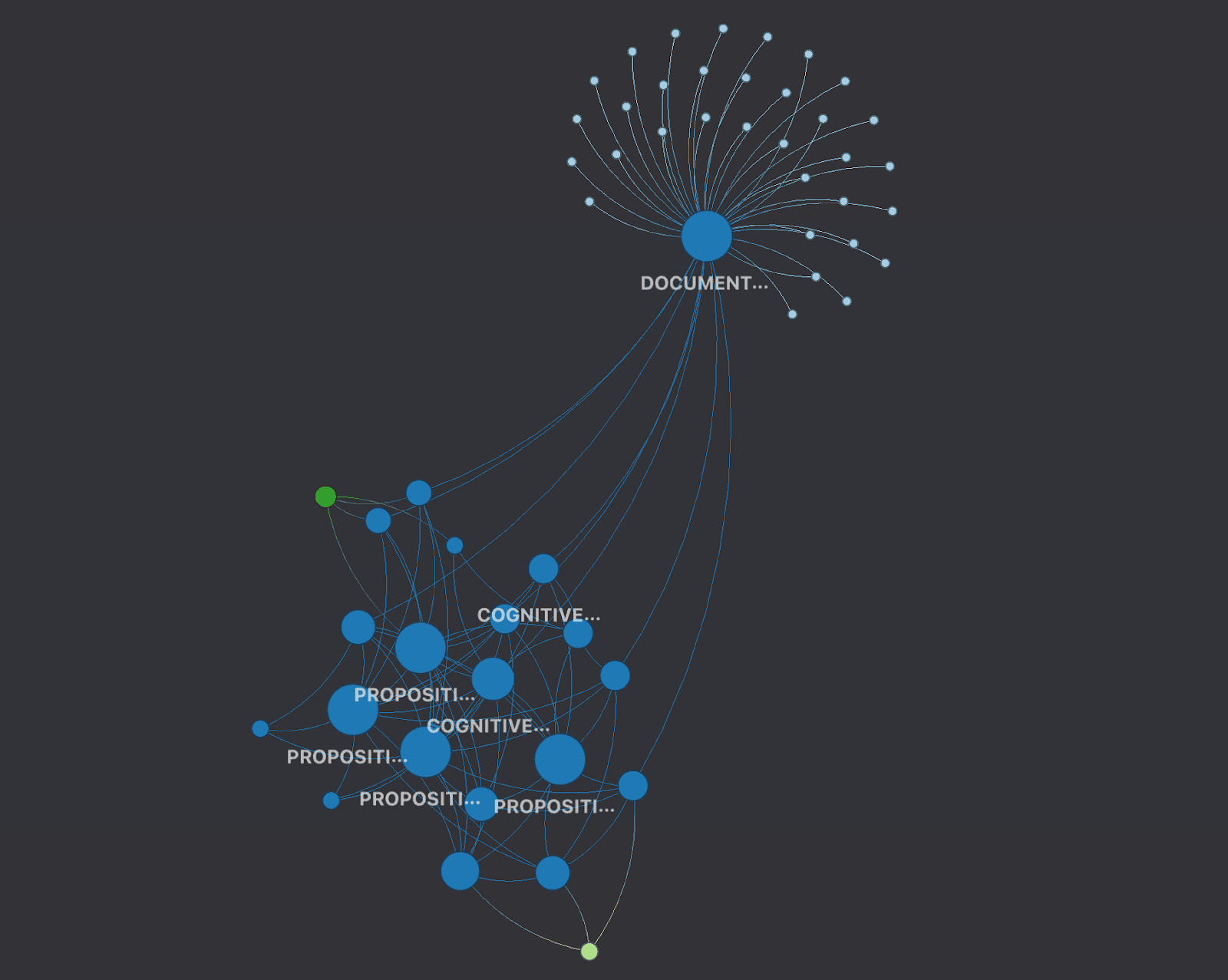
Using cognee and dlt+DuckDB+graphs, we can connect and enrich datasets that were previously unrelated, as well as analyze the data more effectively to get better, more deterministic insights.
By integrating DuckDB with Cognee, RAG developers can seamlessly use a relational store and have a metastore available for their documents and data.
The following sections will cover some basic strategies for building RAGs, including the use of vector and graph stores. We will focus on the data preparation aspect of the flow, using tools like dlt to help us along the way. Finally, we will create a simple loader to demonstrate how structuring data for RAGs could work.
A simple answer is: yes. If you are running a simple RAG as a demonstration, you will probably not need a metastore.
However, in case you want to run a RAG in production, things become more complicated.
You often need to maintain specific user contexts, organize and store the data, load IDs, and, in general, write a lot of code to ensure your data does not get overwritten and can be retrieved when needed, as well as that you have the appropriate guardrails in place to make it work.
Dlt and DuckDB can help us build a RAG system in several ways.
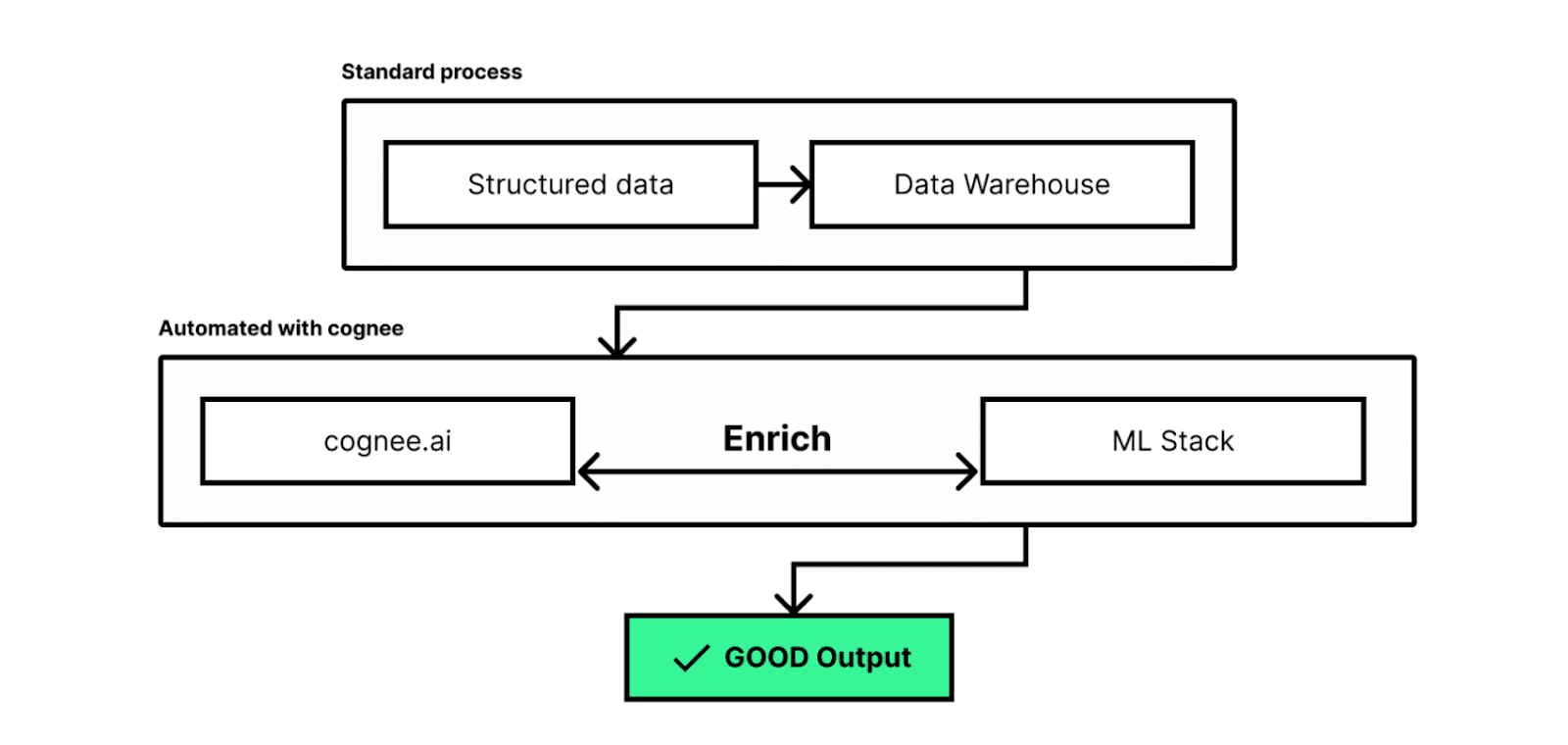
RAG systems usually need loaders and the ability to receive and process multiple data types. Once the data is loaded, we sometimes need to perform additional analysis on the datasets or extract summaries in order to provide information to our RAG so that it can navigate the large amounts of provided data more efficiently.
In the demo below, we show how to perform the following tasks:
First, let’s add some data:
Copy code
import requests
import os
import os
# URL of the file you want to download
url = 'https://www.libraryofshortstories.com/storiespdf/soldiers-home.pdf'
# The path to the folder where you want to save the file
folder_path = '.data/example/'
# Create the folder if it doesn't already exist
if not os.path.exists(folder_path):
os.makedirs(folder_path)
# The path to the file where you want to save the PDF
file_path = os.path.join(folder_path, 'soldiers-home.pdf')
# Download the file
response = requests.get(url)
# Check if the request was successful (status code 200)
if response.status_code == 200:
with open(file_path, 'wb') as file:
file.write(response.content)
print(f'File downloaded and saved to {file_path}')
else:
print(f'Failed to download the file. Status code: {response.status_code}')
import cognee
from os import listdir, path
data_path = path.abspath(".data")
results = await cognee.add("file://" + file_path, "example")
for result in results:
print(result)
We can use DuckDB to easily fetch the datasets we need:
Copy code
datasets = cognee.datasets.list_datasets()
print(datasets)
for dataset in datasets:
print(dataset)
data_from_dataset = cognee.datasets.query_data(dataset)
for file_info in data_from_dataset:
print(file_info)
And we can also interact with DuckDB directly:
Copy code
import duckdb
from cognee.root_dir import get_absolute_path
db_path = get_absolute_path("./data/.cognee_system")
db_location = db_path + "/cognee.db"
print(db_location)
db = duckdb.connect(db_location)
tables = db.sql("SELECT DISTINCT schema_name FROM duckdb_tables();").df()
print(list(filter(lambda table_name: table_name.endswith('staging') is False, tables.to_dict()["schema_name"].values())))
Next, we can create graphs out of our datasets:
Copy code
import cognee
graph = await cognee.cognify("example")
Now, it’s time to search:
Copy code
from cognee.api.v1.search.search import SearchType
query_params = {
"query": "Tell me about the soldier and his home",
}
results = await cognee.search(SearchType.SIMILARITY, query_params)
for result in results:
print(result)
The context that is returned is the following:
Copy code
['Soldier’s Home\nErnest Hemmingway\nKrebs went to the war from a Methodist college in Kansas. There is a picture which shows him \namong his fraternity brothers, all of them wearing exactly the same height and style collar. He \nenlisted in the Marines in 1917 and did not return to the United States until the second division \nreturned from the Rhine in the summer of 1919.\nThere is a picture which shows him on the Rhine with two German girls and another corporal. \nKrebs and the corporal look too big for their uniforms. The German girls are not beautiful. The \nRhine does not show in the picture.\nBy the time Krebs returned to his home town in Oklahoma the greeting of heroes was over. He \ncame back much too late. The men from the town who had been drafted had all been welcomed \nelaborately on their return. There had been a great deal of hysteria. Now the reaction had set in. \nPeople seemed to think it was rather ridiculous for Krebs to be getting back so late, years after \nthe war was over.\’...]
DuckDB, dlt and Cognee play a crucial role in optimizing and supporting RAG systems, thereby providing solutions to the challenges of data handling and processing. We can streamline the management of diverse data types through efficient loaders and robust data operations which are essential for the functioning of RAG systems.
In our demonstration, we used DuckDB as a metastore and dlt to load various datasets into the system and efficiently manage data-related tasks including extraction, normalization, validation, and transformation.
As a next step, we may want to try DuckDB for storing embeddings and create an analytical layer to enrich the graph with additional information.
![Developing a RAG Knowledge Base with DuckDB [SentenceTransformers]](https://motherduck-com-web-prod.s3.amazonaws.com/assets/img/Search_Using_Duck_DB_series_2_of_3_1_46d1eaba1d.png)