10 min read
Executing SQL Queries
3.1 A Quick SQL Recap
DuckDB is designed to "tickle your SQL brain" by supporting a highly standard-compliant SQL dialect. In this section, the authors review the anatomy of a SQL command within the DuckDB CLI and other clients.
Key takeaways include:
- Structure: Commands are composed of statements (like SELECT) and clauses (like
WHERE, GROUP BY, ORDER BY). - Flexibility: DuckDB handles whitespace freely and is case-insensitive for keywords and identifiers, allowing users to format queries for maximum readability.
- Execution: Commands in the CLI are terminated with a semicolon.
- Core Clauses: The chapter reviews the logical order of operations:
WHEREfilters rows before aggregation,GROUP BYbuckets data into keys, andORDER BYsorts the final result set.
3.2 Analyzing Energy Production
To demonstrate OLAP capabilities in a real-world context, the chapter introduces a concrete dataset: Photovoltaic Data Acquisition (PVDAQ) from the U.S. Department of Energy.
3.2.1 Downloading the dataset
This section outlines the data sources and ingestion methods. The dataset consists of time-series data representing energy readings (in 15-minute intervals) and market prices, fully documented on GitHub. The chapter demonstrates using the httpfs extension to load CSV data directly from S3 URLs (such as the systems.csv file) or via the NREL API without downloading files locally first.
3.2.2 The target schema
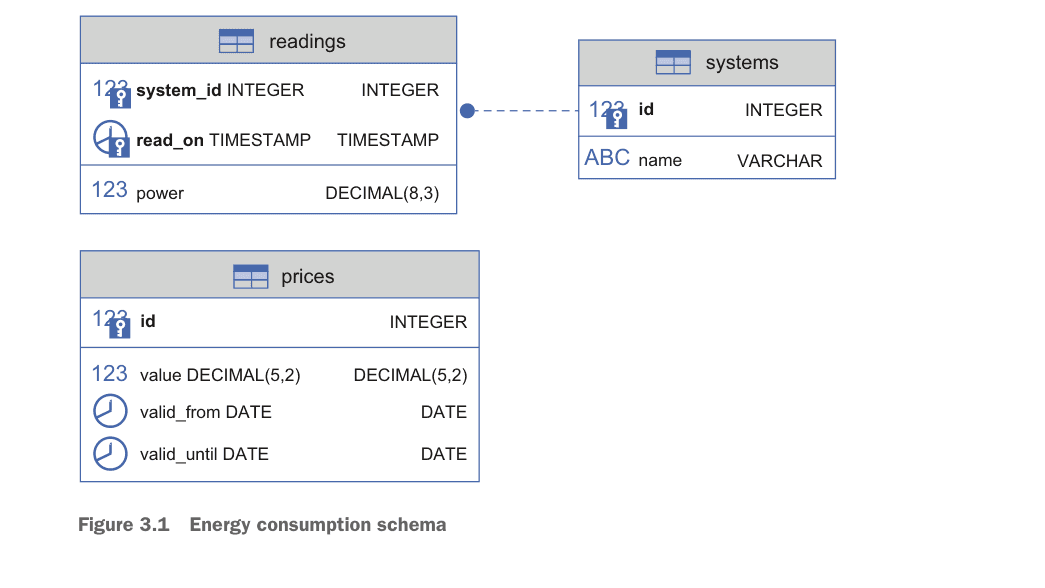
The data is modeled into a normalized schema to support joins and aggregation:
systems: Metadata about the solar panels (using an external ID as a surrogate key).readings: The actual power output (composite keys using system ID and timestamps).prices: Energy prices per kilowatt-hour (kWh), utilizing sequences for IDs.
3.3 Data Definition Language (DDL) Queries
DuckDB is a full-fledged Relational Database Management System (RDBMS). This section details how to structure data persistence using Data Definition Language (DDL), referencing supported SQL statements.
DDL vs DML: SQL Statement Categories
| Category | Purpose | Key Statements | When to Use |
|---|---|---|---|
| DDL (Data Definition) | Define database structure | CREATE, ALTER, DROP | Schema design, table creation |
| DML (Data Manipulation) | Work with data | SELECT, INSERT, UPDATE, DELETE | Querying, data changes |
| DCL (Data Control) | Manage permissions | GRANT, REVOKE | Access control |
| TCL (Transaction Control) | Manage transactions | COMMIT, ROLLBACK | Data integrity |
3.3.1 The CREATE TABLE statement
The authors demonstrate creating tables with specific data types (INTEGER, DECIMAL, TIMESTAMP). They emphasize the use of constraints—PRIMARY KEY, FOREIGN KEY, CHECK, and NOT NULL—to ensure data integrity. Readers are advised to check the documentation on indexes and limitations as these constraints can impact bulk loading performance.
DuckDB Table Constraints Reference
| Constraint | Purpose | Example | Performance Impact |
|---|---|---|---|
PRIMARY KEY | Unique row identifier | id INTEGER PRIMARY KEY | Creates index |
FOREIGN KEY | Referential integrity | REFERENCES other_table(id) | Creates index |
NOT NULL | Prevent missing values | name VARCHAR NOT NULL | Minimal |
CHECK | Custom validation | CHECK(power >= 0) | Evaluated on insert |
UNIQUE | Prevent duplicates | UNIQUE (valid_from) | Creates index |
DEFAULT | Auto-fill values | DEFAULT 0 | None |
3.3.2 The ALTER TABLE statement
Schema requirements often evolve. This section covers ALTER TABLE for adding columns (e.g., adding a validity date to prices) or renaming columns. It also introduces Create Table As Select (CTAS), a powerful shortcut to duplicate table structures and content in a single command, such as CREATE TABLE prices_duplicate AS SELECT * FROM prices.
3.3.3 The CREATE VIEW statement
The chapter explains CREATE VIEW as a method to encapsulate complex logic—such as converting Watts to kWh per day—creating an internal API for the database.
3.3.4 The DESCRIBE statement
The DESCRIBE statement is highlighted as a crucial tool for introspection. It works not just on tables, but on views, queries, and even remote CSV/Parquet files to preview schemas before ingestion.
3.4 Data Manipulation Language (DML) Queries
DML is the engine of data analysis. This section moves beyond simple queries to complex data transformations. Code examples are available in the GitHub repository.
3.4.1 The INSERT statement
The chapter explores robust data entry strategies:
- Idempotency: Using
INSERT INTO ... ON CONFLICT DO NOTHINGto safely handle duplicate data. - Insert from Select: Pipelines often pipe data directly from a
SELECTquery on a raw file into a structured table.
3.4.2 Merging data
For refining messy datasets, the authors demonstrate ON CONFLICT DO UPDATE. This "upsert" capability allows new data to merge with existing records, such as averaging a new reading with an existing one if a conflict occurs on the composite key.
Handling Duplicates: ON CONFLICT Options
| Strategy | Syntax | Use Case |
|---|---|---|
| Ignore duplicates | ON CONFLICT DO NOTHING | Idempotent inserts, skip existing |
| Update on conflict | ON CONFLICT DO UPDATE SET col = value | Upsert/merge new data |
| Replace entirely | INSERT OR REPLACE | Shorthand for full replacement |
| Conditional update | ON CONFLICT DO UPDATE SET col = CASE... | Complex merge logic |
3.4.3 The DELETE statement
The authors show how to clean data sets (e.g., removing readings taken at irregular minute intervals) using DELETE combined with date functions like date_part.
3.4.4 The SELECT statement
This is the core of the chapter, detailing how to retrieve and reshape data (see the SELECT documentation).
- The VALUES clause: DuckDB allows
VALUESto be used as a standalone statement (e.g., to mock data) or within aFROMclause to generate virtual tables on the fly.
The GROUP BY Clause
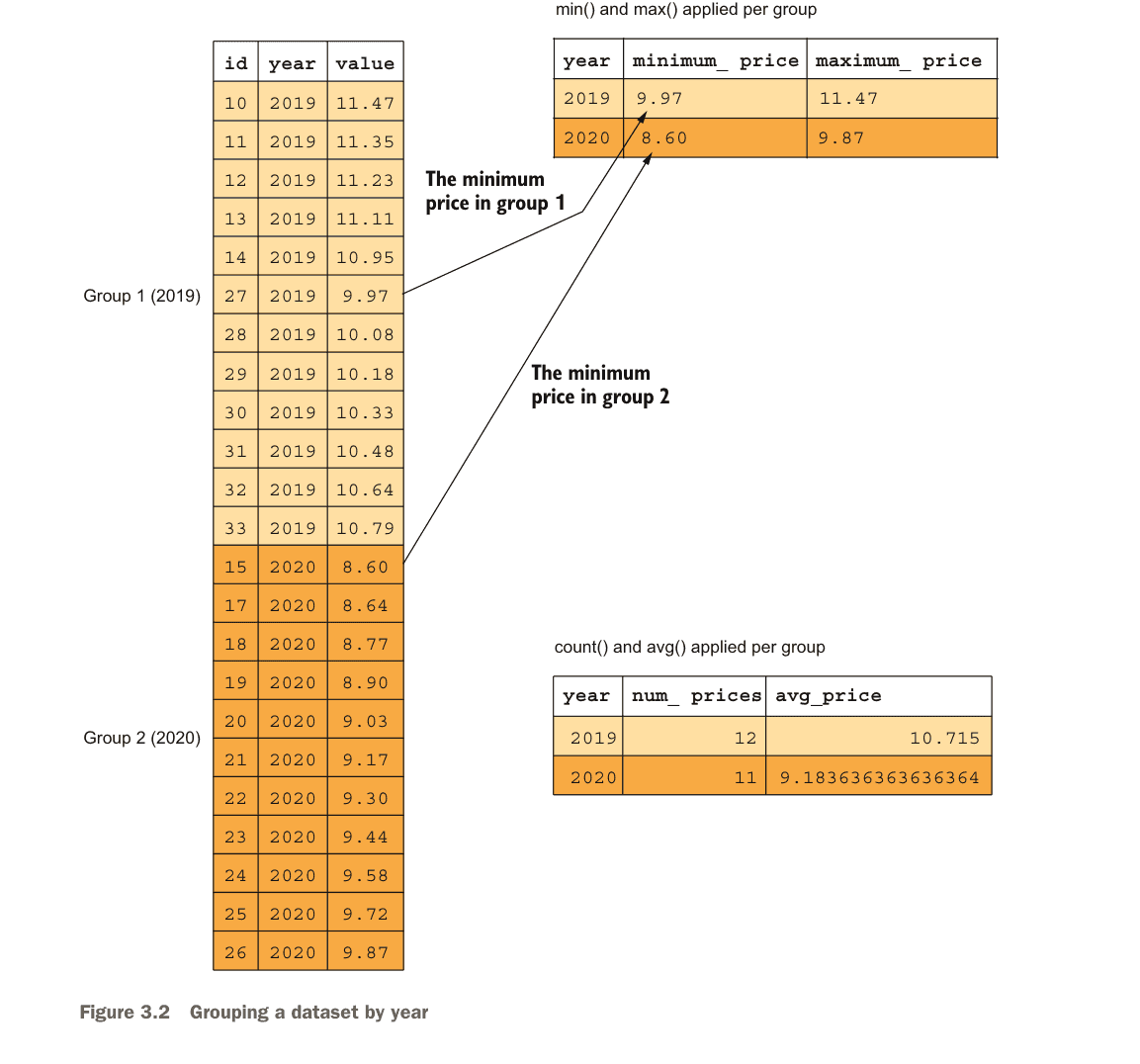
The GROUP BY clause generates one row of output per unique value of specified columns. All grouped values get aggregated via functions like count, sum, avg, min, or max.
- The JOIN clause: The chapter covers
INNER,LEFT/RIGHT OUTER, andFULL OUTERjoins. It specifically highlights the ASOF JOIN as a solution for the energy use case, allowing readings to be matched with the most recent valid price ("as of" the reading time) without requiring exact timestamp matches.
Understanding INNER JOIN
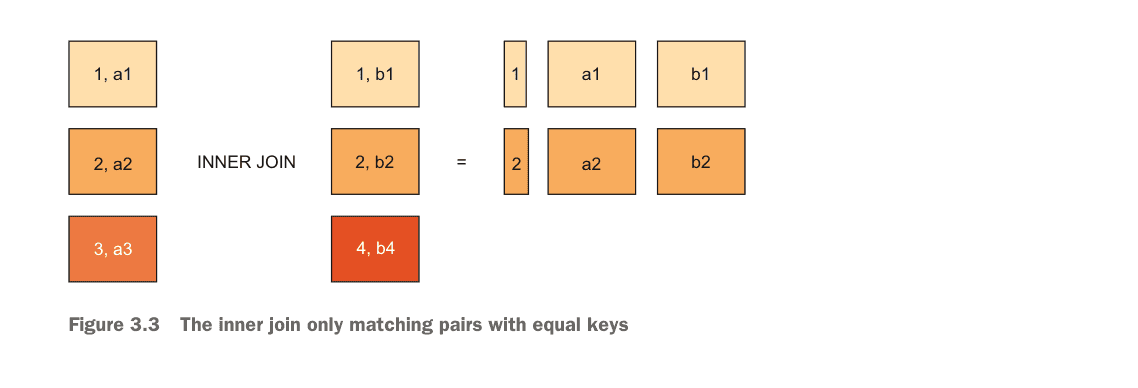
An inner join matches all rows from the left-hand side to rows from the right-hand side that have a column with the same value. Rows without matches are excluded.
Understanding OUTER JOINs
Outer joins supplement NULL values for rows that have no matching entry on the other side. LEFT OUTER includes all left rows, RIGHT OUTER includes all right rows, and FULL OUTER includes all rows from both tables.
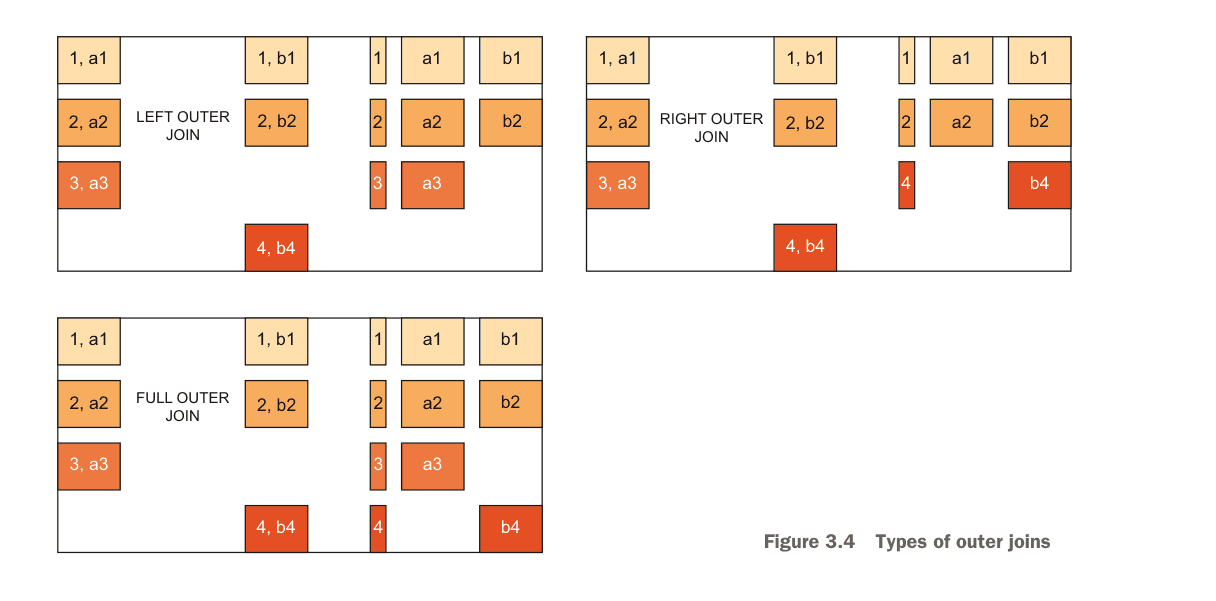
DuckDB JOIN Types Comparison
| JOIN Type | Returns | NULL Handling | Best For |
|---|---|---|---|
| INNER JOIN | Only matching rows from both tables | Excludes non-matches | Required relationships |
| LEFT OUTER JOIN | All left rows + matching right | NULL for unmatched right | Optional enrichment |
| RIGHT OUTER JOIN | All right rows + matching left | NULL for unmatched left | Reverse of LEFT |
| FULL OUTER JOIN | All rows from both tables | NULL for either side | Complete dataset merge |
| CROSS JOIN | Cartesian product (all combinations) | N/A | Generating combinations |
| ASOF JOIN | Nearest match by inequality | Temporal/range matching | Time-series data |
- The COPY TO command: A sidebar highlights how to build data pipelines using
COPY (SELECT ...) TO 'file.csv'. This allows users to join data from multiple files and export a clean, deduplicated result to a single output file. - The WITH clause (CTEs): Using Common Table Expressions to break complex logic into readable, modular parts.
- Recursive Queries: A detailed example of
WITH RECURSIVEto query graph-shaped structures (tree traversal). - Aggregates: Beyond standard
SUMandCOUNT, the chapter introduces advanced DuckDB aggregates likearg_max(finding the row associated with a maximum value),list(creating arrays), and statistical functions.
Essential DuckDB Aggregate Functions
| Function | Purpose | Example |
|---|---|---|
COUNT(*) | Count all rows | SELECT COUNT(*) FROM readings |
SUM(col) | Sum values | SELECT SUM(power) FROM readings |
AVG(col) | Average value | SELECT AVG(power) FROM readings |
MIN/MAX(col) | Extreme values | SELECT MAX(power) FROM readings |
arg_max(expr, col) | Value at maximum | SELECT arg_max(read_on, power) |
arg_min(expr, col) | Value at minimum | SELECT arg_min(read_on, power) |
list(col) | Aggregate into array | SELECT list(name) FROM systems |
first(col) | First value in group | SELECT first(power) FROM readings |
any_value(col) | Any value from group | SELECT any_value(name) |
3.5 DuckDB-Specific SQL Extensions
DuckDB aims to make SQL more "user-friendly." This section showcases proprietary extensions that solve common pain points in standard SQL.
DuckDB SQL Extensions vs Standard SQL
| Feature | Standard SQL | DuckDB Extension | Benefit |
|---|---|---|---|
| Exclude columns | Must list all wanted columns | SELECT * EXCLUDE (col) | Simpler queries |
| Replace columns | Requires full column list | SELECT * REPLACE (expr AS col) | In-place transforms |
| Dynamic columns | Not available | SELECT COLUMNS('pattern') | Regex column selection |
| Alias in WHERE | Not allowed | Fully supported | Less repetition |
| Auto GROUP BY | Must list all columns | GROUP BY ALL | Faster ad-hoc queries |
| Auto ORDER BY | Must list all columns | ORDER BY ALL | Convenient sorting |
| Data sampling | Vendor-specific | USING SAMPLE n% | Built-in sampling |
3.5.1 Dealing with SELECT
- Exclude:
SELECT * EXCLUDE (col_name)returns all columns except specific ones. - Replace:
SELECT * REPLACE (expression AS col_name)modifies a column (e.g., rounding values) while keeping the rest of the star-select intact. - Columns Expression: Using regular expressions or lambda functions to select columns dynamically. For example,
SELECT COLUMNS('valid.*')grabs all columns starting with "valid".
3.5.2 Inserting by name
INSERT INTO ... BY NAME automatically maps source columns to target columns by name, reducing the fragility of positional inserts.
3.5.3 Accessing aliases everywhere
Unlike standard SQL, DuckDB allows you to reuse column aliases defined in the SELECT clause immediately within the WHERE and GROUP BY clauses, significantly reducing code duplication.
3.5.4 Grouping and ordering by all relevant columns
The introduction of GROUP BY ALL and ORDER BY ALL automatically infers the non-aggregated columns, making ad-hoc analysis faster and less verbose.
3.5.5 Sampling data
The USING SAMPLE clause allows analysts to instantly query a percentage or fixed number of rows from massive datasets. The sampling documentation covers the specific algorithms used (Bernoulli or Reservoir methods).
3.5.6 Functions with optional parameters
DuckDB functions, such as read_json_auto, often support named, optional parameters. This allows users to specify configuration like dateformat without needing to provide arguments for every single parameter in a specific order.
Summary
- Structure: SQL queries are built from statements and clauses. They are broadly categorized into Data Definition Language (DDL) for structure and Data Manipulation Language (DML) for data operations.
- Scope of DML: DML queries cover creating, reading, updating, and deleting rows. In DuckDB, reading data is considered manipulation as it involves transforming existing relations into new result sets.
- Persistence: DDL queries (
CREATE TABLE,CREATE VIEW) define a persistent schema. This works identically whether DuckDB is running in-memory or on disk. - Data Integrity: Defining a rigid schema helps identify data inconsistencies that might be missed in schemaless systems. Constraint errors during ingestion can be handled gracefully using
ON CONFLICTclauses. - Innovation: DuckDB significantly lowers the barrier to writing complex SQL with features like
SELECT * EXCLUDE,SELECT * REPLACE, and intuitive alias usage that works across different clauses.
Continue Reading: Chapter 2: The DuckDB CLI | Chapter 4: Advanced Analytics
Related: Learn how MotherDuck extends DuckDB to the cloud with serverless analytics.