What is an OLAP Database? Concepts, Examples, and Modern Use Cases
12 min readBY
We've all encountered that moment when your trusty transactional database, which hums along perfectly for day-to-day operations, starts to groan under the weight of complex analytical questions. It’s like asking your speedy race car to suddenly haul a load of bricks. It might do it, but it’s not going to be pretty, and you’ll probably wish you had a heavy-duty truck.
Today, let's talk about that "heavy-duty truck" for data analytics: Online Analytical Processing (OLAP).
So, what is an OLAP database? An OLAP database is a system specifically designed for fast, complex analysis of large volumes of historical data. Unlike transactional databases (OLTP) that handle day-to-day transactions, an Online Analytical Processing (OLAP) system is optimized for multi-dimensional queries, enabling rapid business intelligence and reporting.
By the end of this article, you'll have a solid grasp of:
- What is OLAP, and how does it differ from its transactional cousin, OLTP?
- The core concepts that make OLAP tick, like cubes, dimensions, and measures.
- The different flavors of OLAP systems (MOLAP, ROLAP, HOLAP) and their trade-offs.
- Why these concepts are still incredibly relevant in our modern data stacks.
Why should you care? Because understanding OLAP can help you build or leverage systems that allow for rapid, interactive exploration of large datasets. It’s about empowering analysts and decision-makers to slice, dice, and drill down into data without those agonizing waits. It's about making data actually useful for intelligence, not just a dumping ground.
Let's get our ducks in a row and dive in!
OLAP vs. OLTP: The Two Sides of the Data Coin
First things first, let's clear up a common point of confusion: OLAP versus OLTP (Online Transaction Processing). They sound similar, but they're designed for very different jobs.
OLTP systems are the workhorses of daily operations. Think of ATM transactions, order entry, or inventory updates. These systems are optimized for fast, reliable, and frequent short transactions. They deal with current data and prioritize data integrity and speed of individual transaction processing. You want these systems to be quick and accurate for putting data in.
OLAP systems, on the other hand, are all about getting insights out. They are designed for complex queries, analyzing large volumes of historical data, and allowing users to explore data from multiple perspectives. Speed here is measured by how quickly you can answer a complex business question, not how fast you can record a sale. Neither approach is inherently "better"—they're just optimized for different tasks. In practice, most organizations need both: OLTP systems to run the business and OLAP systems to understand it.
The Heart of OLAP: Cubes, Dimensions, and Measures
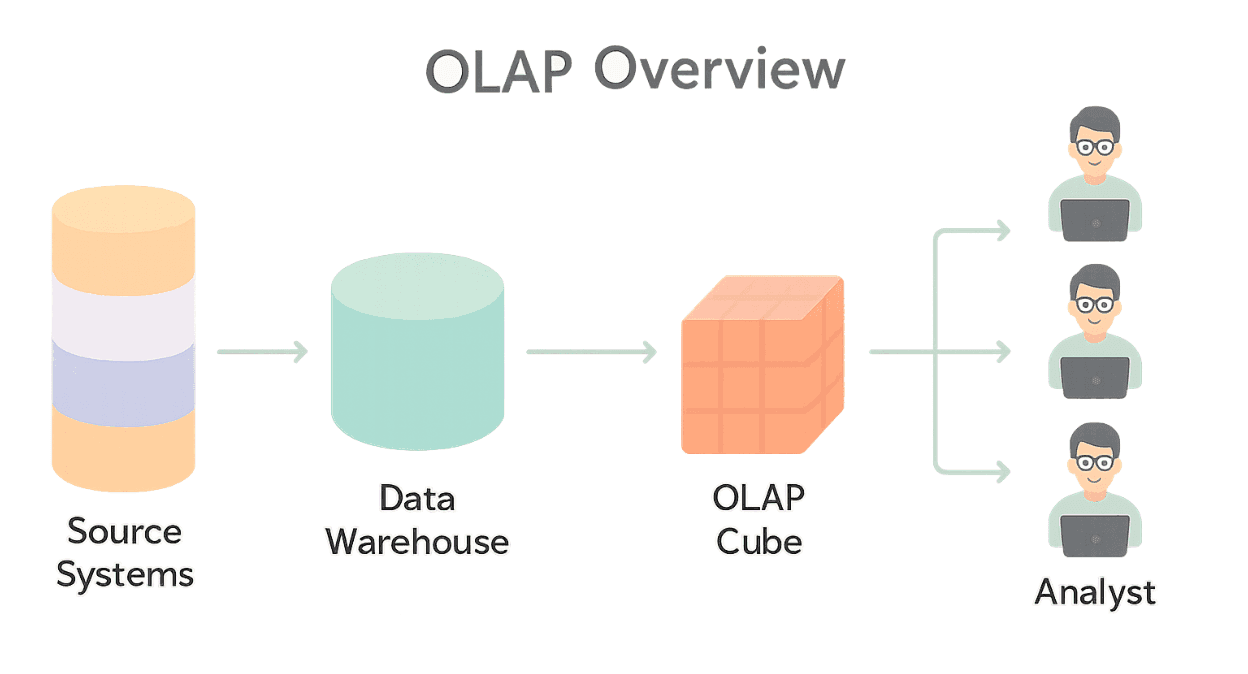
At the core of most OLAP systems is the OLAP cube (sometimes called a hypercube, especially if you're feeling fancy and have more than three dimensions). Now, don't get too hung up on the "cube" imagery. It's more of a conceptual data structure than a literal geometric shape, especially since you can have many more than three "sides" or dimensions.
Think of it as a way to organize data that allows for this multidimensional analysis.
Here's what makes up a cube:
- Dimensions: These are the categories you use to describe your data. For example, if you're analyzing sales data, your dimensions might be
Time(Year, Quarter, Month, Day),Geography(Country, Region, City, Store), andProduct(Category, Brand, SKU). Dimensions often have hierarchies, allowing you to drill down or roll up. For instance, you can look at sales byYear(rolled up) or byDay(drilled down). - Measures: These are the quantitative values you want to analyze – the numbers. Following our sales example, measures could be
Sales Amount,Quantity Sold, orProfit. These are the values that populate the "cells" of your cube, at the intersection of your chosen dimensions.
So, you could look at Sales Amount (measure) for Electronics (Product dimension) in North America (Geography dimension) during Q4 2023 (Time dimension).
Making Moves with OLAP: Common Operations
The real power of OLAP comes from the operations that let you navigate and manipulate these data structures:
Slice
This is like taking a single slice out of your cube by fixing one dimension to a specific value. For example, you could slice your sales cube by Time = "Q4 2023" to see all product sales across all regions just for that quarter. The result is essentially a new, smaller cube with one less dimension.
Dice
Dicing is similar to slicing, but you're defining a subcube by picking specific values for multiple dimensions. For example, you could dice to see sales for Product Category = "Laptops" AND Region = "Europe" across all available time periods.
Drill-Down
This operation lets you navigate from more summarized data to more detailed data within a dimension's hierarchy. You could drill down from Year to Quarter to Month to see sales figures at a finer granularity. It’s like zooming in on your data.
Roll-Up
This is the opposite of drill-down. You aggregate data along a dimension hierarchy, moving from more detailed data to a more summarized view. For example, you could roll up sales data from City to Country.
Pivot
Pivoting allows you to rotate the cube's axes to get a different perspective on the data. You might swap what's on the rows and columns of your view, perhaps looking at Products down the side and Time across the top, and then pivoting to see Time down the side and Regions across the top.
These operations are what make OLAP tools so powerful for business intelligence and ad-hoc analysis. They allow users, even those who aren't SQL wizards, to explore data and uncover insights.
Flavors of OLAP: MOLAP, ROLAP, and HOLAP
OLAP systems aren't a one-size-fits-all solution. There are a few main architectural approaches, each with its own set of characteristics:
MOLAP (Multidimensional OLAP)
- How it works: MOLAP systems store data in optimized, multidimensional array structures (our "cubes"). Data is often pre-aggregated and pre-calculated, meaning summaries are already computed and stored.
- Pros: This pre-aggregation generally leads to very fast query performance. If you need lightning-fast slicing and dicing for common queries, MOLAP can be great.
- Cons: Loading data into these specialized cube structures can sometimes be a slower process. Also, because you're storing aggregated data, there can be some data redundancy, and the cubes themselves can sometimes become very large, a phenomenon sometimes referred to as "data explosion." Historically, MOLAP cubes could be somewhat rigid; changing the dimensions often meant remodeling the entire cube.
ROLAP (Relational OLAP)
- How it works: ROLAP systems leverage your existing relational databases (like those that might use star or snowflake schemas) to store and manage data. Instead of pre-calculating everything, ROLAP tools dynamically generate SQL queries against the relational tables to fetch the data needed for analysis.
- Pros: ROLAP can typically handle very large volumes of data because relational databases are good at that. It can also be more flexible if your data structures change frequently, as you're working directly with the relational model.
- Cons: Query performance can sometimes be slower compared to MOLAP, especially for very complex queries, because the aggregations are often performed on-the-fly.
HOLAP (Hybrid OLAP)
- How it works: As the name suggests, HOLAP systems try to offer the best of both worlds by combining MOLAP and ROLAP approaches. Typically, they store aggregated summary data in a MOLAP-style multidimensional store for fast access, while detailed, granular data remains in a ROLAP-style relational database.
- Pros: This can provide a good balance between performance (from MOLAP for summaries) and scalability/flexibility (from ROLAP for details). Users can get fast answers for high-level queries and still drill down to the nitty-gritty details when needed.
- Cons: HOLAP systems can be more complex to design, implement, and maintain, as you're managing two different types of data storage and access.
Real-World OLAP Examples
To understand the practical power of OLAP, let's look at how it's applied in different industries. These examples showcase how OLAP databases turn massive datasets into actionable intelligence.
- Retail & E-commerce: A national retailer uses an OLAP system to analyze sales trends. A manager can instantly query: "Compare sales of running shoes in California versus New York, sliced by quarter, for the last two years." The system aggregates terabytes of transactional data in seconds to provide the answer, a task that would overwhelm a traditional database.
- SaaS Product Analytics (Embedded Use Case): A primary use case for MotherDuck is embedding analytics into customer-facing products. For instance, a B2B SaaS company uses MotherDuck to power a customer-facing dashboard. They can offer real-time OLAP analytics, allowing their customers to slice and dice their own usage data, asking questions like: 'What is the retention rate of users who adopted the new dashboard feature in Q1?' This is possible without managing complex infrastructure.
- Finance: A financial institution uses an OLAP database for risk management. Analysts can roll-up millions of individual transactions to get a high-level view of risk exposure by region, then drill-down into specific loan types or branches to identify anomalies. This interactive analysis is crucial for quarterly reporting and regulatory compliance.
OLAP in the Modern Data Stack: Still Quacking?
You might be thinking, "Okay, this cube stuff sounds a bit like something from the 90s. Is OLAP still relevant with all the fancy new data warehouses, lakehouses, and query engines we have today?"
The answer is a resounding yes, though its form has evolved. The principles of OLAP – multidimensional thinking, hierarchical aggregation, and interactive exploration – are more important than ever.
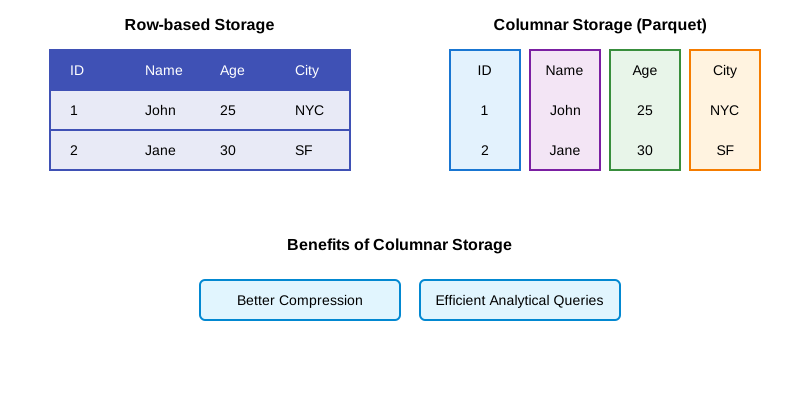
Modern analytical databases and query engines, like Apache Druid and our nimble friend DuckDB, when used for analytical workloads, incorporate many OLAP-like concepts. They are designed for fast analytical queries, often using columnar storage, advanced indexing, and query optimization techniques to deliver speed and support for aggregations and filtering that feel very OLAP-ish.
Some modern OLAP systems focus on real-time analytics, allowing you to query data as it streams in, a far cry from the batch-updated cubes of old. The idea of pre-computation still exists, but it might be in the form of materialized views, optimized data layouts, or intelligent caching rather than static, monolithic cubes.
Platforms like MotherDuck, which builds upon DuckDB, aim to provide serverless analytics capabilities, making it easier to deploy and scale systems that can handle these kinds of analytical queries without some of the heavy lifting traditionally associated with OLAP infrastructure.
The key takeaway is that the need for fast, interactive, multidimensional analysis hasn't gone away. If anything, with ever-growing data volumes, it's become even more critical. Today's tools might not always scream "OLAP cube!" from the rooftops, but many of the successful ones are built on the same foundational ideas that made OLAP useful in the first place.
What Makes Modern OLAP Systems Different?
While the core principles of OLAP remain, modern tools have evolved beyond the rigid cubes of the past. Today's leading solutions, including serverless warehouses like MotherDuck, are characterized by:
- Decoupled & Serverless Architecture: Eliminating the need to manage complex infrastructure, allowing for focus on analysis, not operations.
- Columnar Storage: Data is stored in columns instead of rows, dramatically speeding up the aggregation queries typical in OLAP analytics.
- Real-Time Data Ingestion: The ability to analyze data as it streams in, rather than relying on slow, batch-updated cubes.
- SQL-based Interfaces: Leveraging the familiar SQL language, making powerful analytics accessible without needing to learn proprietary query languages.
Key Applications and Use Cases for OLAP Analytics
So, when should you, as a data engineer or analyst, start thinking in OLAP terms or look for OLAP-like capabilities?
- Complex Analytical Queries: If your users need to ask "what if" questions, compare data across many categories, or look for trends and patterns, OLAP principles are your friend.
- Interactive Data Exploration: When analysts need to "play" with the data, drilling down, rolling up, and pivoting to follow their train of thought, an OLAP-friendly system is invaluable.
- Performance for Reporting/BI: If slow-running reports and dashboards are a constant headache, exploring OLAP techniques or OLAP-centric tools can provide significant speed-ups.
- Consistent View of Data: OLAP systems can help provide a "single source of truth" for analytical reporting by ensuring calculations and aggregations are performed consistently.
It’s not about implementing a specific technology labeled "OLAP" in all cases. It's about recognizing when the problems OLAP was designed to solve are present, and then leveraging the right tools and techniques – whether traditional or modern – to address them.
Wrapping Up
OLAP, at its core, is about making large, complex datasets understandable and actionable. While the specific technologies have evolved, the fundamental concepts of multidimensional analysis, fast query performance for analytical workloads, and interactive data exploration remain incredibly relevant for any data professional.
Understanding these principles can help you design better data models, choose more appropriate tools for your analytical needs, and ultimately, empower your users to get the insights they need without pulling their hair out waiting for queries to run. It's one of those areas where a bit of foundational knowledge can make a big practical difference in your day-to-day work. So, the next time you're faced with a gnarly analytical challenge, remember the cube – it might just point you in the right direction.
Start using MotherDuck now!
FAQS
What are common use cases for OLAP databases?
Business intelligence, reporting, financial and budget analysis, marketing and sales analysis, supply chain management, inventory and logistics analysis, product analytics, trend forecasting and more.
How is OLAP different from OLTP?
OLAP is for analytics and doing large-scale aggregation queries such as sales-by-month, average page views per day per page, etc. OLTP is for transactional data - storing a row of data (like a user profile) and retrieving data by point lookups (look up user by e-mail address).
Which systems or tools offer OLAP functionality?
MotherDuck, DuckDB, ClickHouse, Apache Druid, Pinot, Snowflake, Google BigQuery, AWS Redshift
Can OLAP be used for customer-facing analytics?
Yes! MotherDuck’s architecture supports low-latency, product-embedded analytics. The hypertenancy of MotherDuck ducklings supports many simultaneous users running on independent DuckDB instances.
Does DuckDB support OLAP-like functionality?
Absolutely! DuckDB uses columnar storage and has vectorized query execution, which is perfect for OLAP.
Does DuckDB scale as an OLAP database?
While DuckDB is based on a single-node architecture, modern machines are beefy enough to handle hundreds of gigabytes and terabytes of data on a single machine. Additionally, cloud data warehouses like MotherDuck enable scaling out horizontally as well, with read scaling and hypertenancy.
What’s the cost or performance benefit of MotherDuck vs. other OLAP platforms?
MotherDuck, based on DuckDB, is super efficient and is able to pass on those cost savings to customers, while being highly performant.