“Would you rather fight a horse-sized duck or 100 duck-sized horses?” That’s the interview question we give to every job applicant at MotherDuck. The correct answer, of course, is that anyone who would pick a fight with a giant duck gets removed from consideration immediately, as obviously unsuited to work at a company called “MotherDuck.” We don’t have anything against horses, but we are rather sensitive towards anyone choosing to harm web-footed waterfowl.
Aside from the absurdity of this question, it is actually a pretty decent metaphor for the technology we’ve built at MotherDuck. Whereas most of the prevailing analytical databases are designed around having a bunch of small instances working in concert, we made the conscious decision to let our ducklings get big rather than to harness more of them at once. A Snowflake 3XL, for example, is basically 64 Snowflake extra-small instances in a trenchcoat; that is, 64 fixed-sized instances that are networked together to collaborate on running queries. A MotherDuck Giga instance, on the other hand, has about the same amount of CPU and RAM as a Snowflake 3XL, but is in a single, very large machine.
One of the points I made in the blog post “Big Data is Dead” four years ago was that the line between what is considered “normal” data size and “big” data keeps moving. Above the line for “big” data means you have to use special handling, special compute, special storage to be able to use it effectively. “Normal” data is the size that just works, typically what you can process on a single machine. As the threshold for big data moves higher and higher, the number of workloads that need to be handled using “big” compute architectures goes down.
So where, exactly, is the line for Big Data? In the early days of MotherDuck, we used to describe it as “about a terabyte.” However, since then, machines with hundreds of cores and terabytes of RAM have become pretty standard. Moreover, people have gotten better at writing code for high core counts, which means you continue to get better performance as the number of CPUs in a machine increases. These days, I’d draw the line at least 10x higher, as workloads that are 10s of terabytes are now pretty straightforward to handle on a single machine.
Even now, database people tend to scoff at the idea of a single node architecture. That can’t possibly scale! So I’d like to offer an existence proof. Let’s see how MotherDuck scales to workloads of 10s of terabytes. And let's see how it lines up against more conventional data warehouses with distributed architectures.
Giga Duckling vs the World
Our largest instance at MotherDuck is called a “Giga.” We don’t usually share the precise hardware specifications, but it uses the better part of an instance with 192 cores and 1.5 TB of RAM. I wanted to see how this instance stacks up against other data warehouses as we start to toe the line into big data territory. Just how big can you go before the single node architecture starts to be a liability?
It is dangerous to write blog posts about performance because people tend to accuse you of cheating; either you optimize your system behind the curtain to make it look better or you fail to optimize the competitor’s system to make it look worse. What makes things even more complicated is that many vendors have “no benchmark” clauses in their terms of service that threaten to do nasty things to you if you publish benchmarks.
My solution to this is that I’m only referring to numbers that other people have published. Then I don’t have to worry about violating their terms of service. The downside is that some of them are a little bit old; that would be a deal-breaker if I was trying to say one service was faster than another. But I’m really just trying to show that MotherDuck can keep up.
The other thing that can be somewhat sketchy is when vendors report their own numbers. That’s why a lot of people get third parties to do their benchmarking. But that tends to take a lot of time to do, and I’m taking a slightly different approach; I’m just asking Claude to run the benchmarks, with no special instructions. I also inspect the output to make sure it doesn’t do something weird.
I picked the TPC-DS benchmark because it is the hardest data warehouse benchmark and one that scales to large sizes. It has 99 different queries, with some fiendishly difficult joins. You can generate the benchmark data to run at any scale. A scale factor of 1 corresponds to about 1 GB of data stored and scans about 17 GB of data during the course of the benchmark.
To score the benchmark results, we report the geometric mean of the query times. This is in keeping with the other results that were reported, so we can compare apples to apples. It is also generally considered best practice to use geomean when running database benchmarks because some of the queries have very different complexities and expected runtimes. If you used the total duration or the average (arithmetic mean) duration to compare timings, the results would be dominated by a handful of the longer running queries and the short ones would barely count.
The first terabyte
To start out with, I looked at the TPC-DS 1 TB size (scale factor 1,000). MotherDuck ran this benchmark with a geomean of 690 milliseconds. How does that stack up against other “big data” warehouses? Well, I found a blog post from Fivetran in 2022 that has Redshift at 4.2 seconds, Snowflake 2XL at 4.9 seconds, Databricks 2X at 6 seconds, and BigQuery at 6.1 seconds (data here). This is a few years old, and all of those other systems have likely gotten a lot faster since then, but even so, it doesn’t look like MotherDuck struggles at this data size.
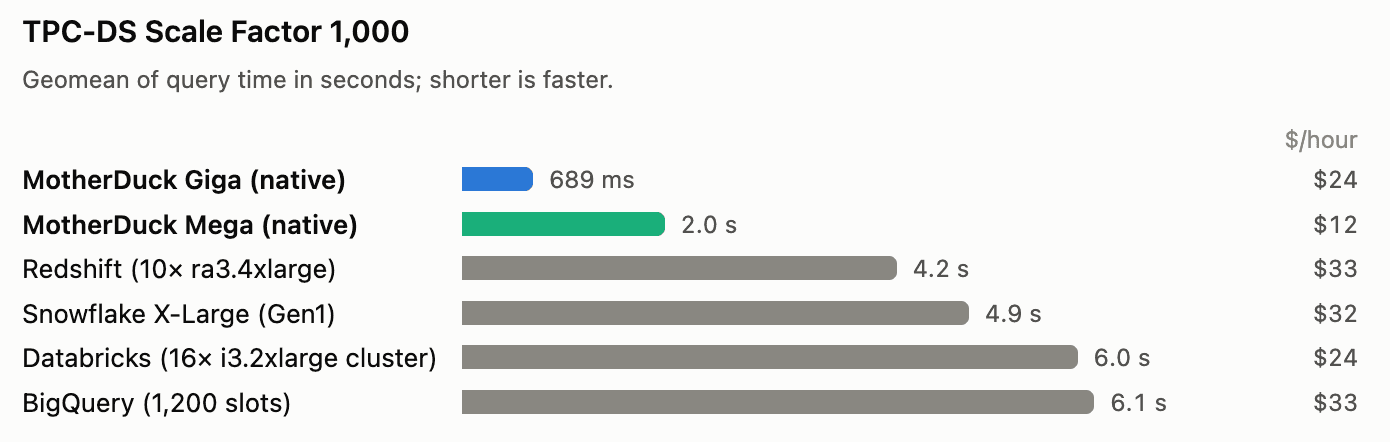
We also ran this benchmark using the smaller MotherDuck Mega instance, which clocked in at 2 seconds, which is still faster than the competitive systems. So you don’t need the biggest duck in the pond to handle the 1 terabyte data size.
Tiny Terabytes
There are times when one terabyte just won’t do. What about ten? Surely the single node DuckDB architecture starts to founder at that point, no? Why don’t we try TPC-DS at scale factor 10,000? This is about 10 Terabytes on disk, and scans 168 Terabytes in the 99 queries of the benchmark. To put this in context, running this benchmark on BigQuery with their default pricing model costs more than $1,000.
The MotherDuck result is now 5.6 seconds geomean. To compare with other data warehouses, I found a blog post from Oracle, also in 2022, that benchmarked Redshift, Snowflake, BigQuery, and Azure Synapse, with instance sizes that are all price-wise just a little bit more expensive than the MotherDuck Giga. The results are pretty close together, with Redshift the fastest of the non-MotherDuck lot at 8 seconds flat.
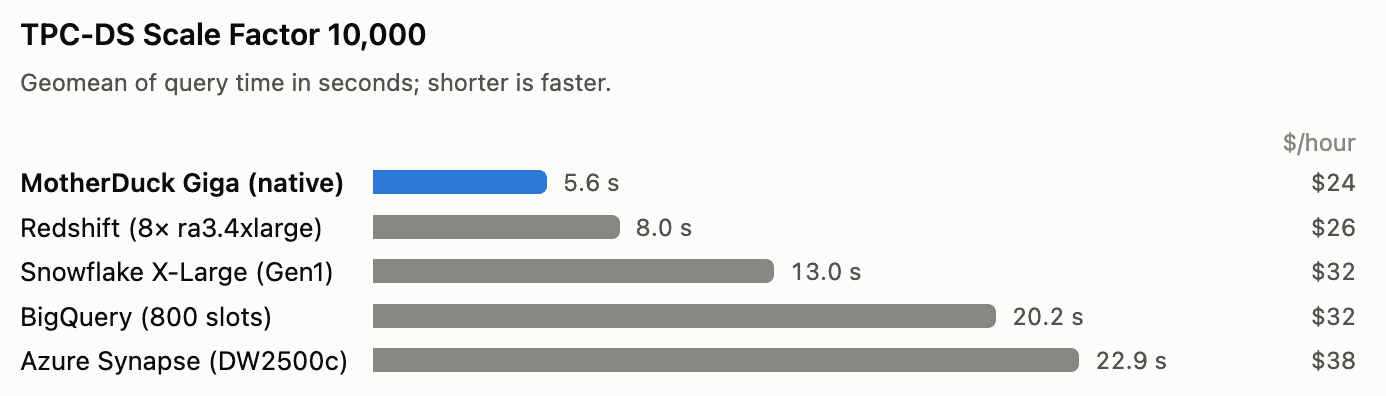
To be clear, the goal here really isn’t to claim that MotherDuck is faster than any other engine. I’m just saying that at scales that many people consider to be “pretty big,” MotherDuck, with the single-node architecture, is competitive. It isn’t just for toy data sizes.
On one hand, these results are a few years old, and every engine on the list has almost certainly gotten faster in that time. On the other hand, I’m also running an older version of DuckDB. DuckDB 2.0 came out last week and has some very significant performance improvements, particularly for larger instances. These benchmarks were done against DuckDB version 1.5.6 because we haven’t upgraded to version 2.0 yet in MotherDuck (we’re waiting for the first patch version to come out next month). So I may not be showing other engines in their best light, but I’m also not showing DuckDB in its best light either.
Ducks, Ducks, and More Ducks
These results show that scaling up can work well to handle large workloads that scan 10s of Terabytes of data. That scale includes the vast majority of workloads at the vast majority of organizations, and the results vindicate the decision by the DuckDB team to focus on making a super fast single node engine.
We bet heavily on DuckDB, as not only a robust engine but also one that was going to get better quickly. This has borne out well because DuckDB has continued to improve at a rapid pace; over the last year the performance on these benchmarks has largely doubled, and we expect that the recently released DuckDB 2.0 is likely going to significantly improve performance again for these workloads.
At MotherDuck we’ve also gotten very good at running DuckDB at scale. Our FlashCache storage engine creates a distributed tiered store underneath DuckDB that provides great performance even on cold starts. On this benchmark, MotherDuck scales as well as competitive systems at a similar or larger price point. We’d go further and say that if a workload can be handled on a Snowflake XL, it would be surprising if you couldn’t do it in MotherDuck faster and less expensively; after all, a MotherDuck Giga has a lower price point and has more CPU and RAM with a lower latency architecture.
We have a long-standing bet going with one of our investors about whether we would need to make MotherDuck run in distributed mode. There are still some workloads that do struggle to scale up, and I’d expect we’d want distributed support before long. In the age of AI, adding distributed support gets easier and easier (I know of three ongoing projects to do so). That said, the number of workloads that need distributed mode is pretty small, and gets smaller over time as machines get bigger. In the meantime, make way for giant ducklings!
Appendix: A note on the Methodology
We ran the standard TPC-DS (99 queries) query sets, unmodified, using the query text that ships in DuckDB's tpcds extension.The queries ran against MotherDuck instances (Mega or Giga) running DuckDB version 1.5.6. The Scale Factor 1k dataset was generated with DuckDB's built-in dsdgen and stored in a MotherDuck share; TPC-DS 10k scale factor set came from Amazon's public dataset (
s3://redshift-downloads/TPC-DS/2.13/10TB) . The queries were fun from a Python DuckDB client (also version 1.5.6) on EC2 in us-east-1, with the parameter attach_mode=single which avoids loading databases other than the ones being used in the benchmark. Each time is client wall-clock and includes fetching the results. The first run is cold, and we report the best of three iterations per query. Results are summarized as the geometric mean of hot query times. The blog posts we compared with also reported ‘hot’ query times, and the approach taken was similar to how snowflake ran TPCH in their own recent blog post.